gear
Starting photography can feel overwhelming. One Google search and suddenly it seems like you need a $5,000 camera, ten lenses, and a degree in tech just to take a decent photo. The truth? You don’t. When you’re just starting out, reliable camera gear matters far more than expensive gear.
This guide breaks down how to choose the right camera gear, what’s actually worth buying as a beginner, and the most popular, affordable photography accessories that help you grow without draining your bank account.
~This post may contain affiliate links, which means I may earn a small commission at no extra cost to you. I only recommend photography gear and tools I genuinely use, trust, or believe will help beginners start with confidence.
How to Choose the Right Camera Gear as a Beginner
When you’re new to photography, the goal is simplicity, reliability, and flexibility. Your gear should help you learn — not intimidate you.
Here’s how to choose wisely:
Prioritize ease of use over advanced features
Buy gear that works for multiple photography styles
Choose accessories that solve real problems (stability, storage, light)
Start affordable — upgrade later as your skills grow
Photography is a skill, not a shopping list. The right beginner gear supports your learning instead of distracting from it.
Essential Camera Gear Every Beginner Photographer Needs
1. Camera Body (DSLR or Mirrorless)
You don’t need the newest model. Look for an entry-level DSLR or mirrorless camera with manual mode so you can learn exposure settings over time.
Real-life tip:
A used or refurbished camera from a trusted seller can save hundreds and still perform beautifully.
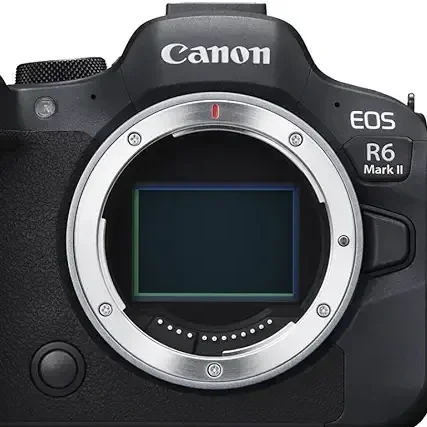
Canon R6 Mark II
Capture stunning photos and professional-quality video of people, nature, and wildlife with the Canon EOS R6 Mark II camera (Body Only).
2. SD Cards (Don’t Skimp Here)
A slow or unreliable SD card can ruin a shoot. Choose Class 10 or UHS-I SD cards from trusted brands.
Why it matters: Faster writing speeds prevent missed shots - Reliable storage protects your images - Having backups saves you from heartbreak
-Most beginner photographers keep at least two SD cards in their bag.
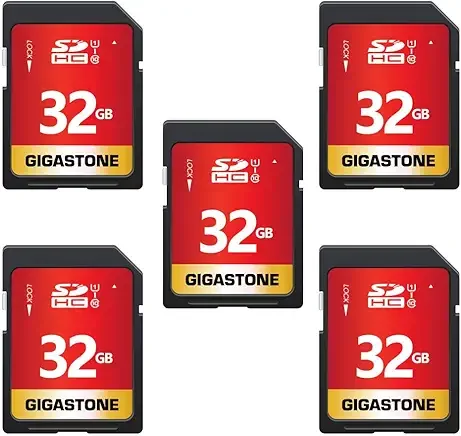
SD cards work well with various devices, particularly trail cameras, and users appreciate their storage capacity.
3. Tripod (Your Sharpness Secret Weapon)
A tripod instantly improves your photos — especially in low light, self-portraits, landscapes, and learning composition.
What to look for:
Lightweight but sturdy
Adjustable height
Quick-release plate
Real-life tip: Even professionals rely on tripods daily. This isn’t “optional” gear — it’s foundational.
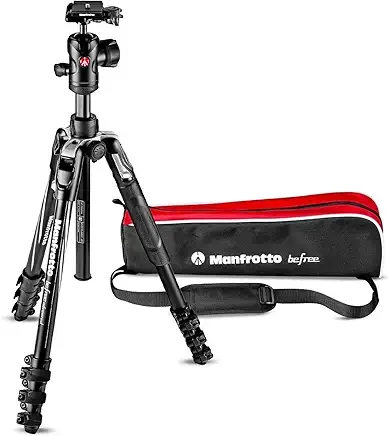
PORTABLE: Intuitive to use & easy to configure. This travel tripod is convenient in all travel situations, the aluminum body makes it strong, yet lightweight. Highly Recommend!
4. Monopod (Optional but Powerful)
If you shoot sports, wildlife, or events, a monopod offers stability without slowing you down.
Why beginners love monopods:
Lightweight
Easy to carry
Improves sharpness while staying mobile
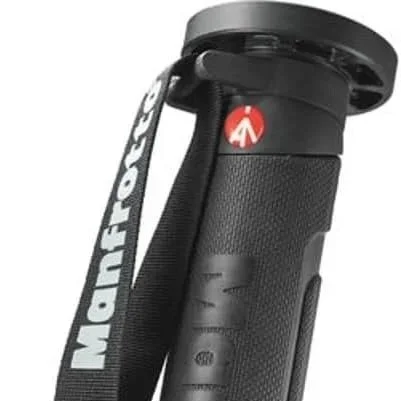
Ideal for Sports Photography
This monopod is of high quality, extremely sturdy with great stability and easy to use.
5. Reflectors (Control Light Without Fancy Gear)
Reflectors are one of the cheapest ways to improve lighting instantly.
Great for: Portraits, Outdoor sessions, and Natural-light photography
A basic 5-in-1 reflector kit gives you multiple lighting options for under $30
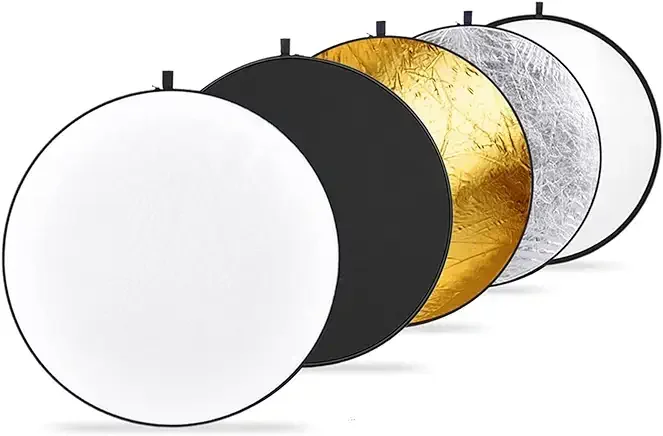
Reflectors 5-in-1collapsible discs
Neewer light reflector is incredibly useful. Versatile for video and portrait shoots. Great for outdoor conditions adding artistic look or filtering the light to soften. Prevents your image from looking overexposed adding a professional look to images and videos.
6. Camera Straps (Comfort Matters)
The strap that comes with your camera? Usually uncomfortable. A padded or cross-body camera strap protects your gear and your neck.
Real-life tip:
If your camera hurts to carry, you’ll shoot less. Comfort increases consistency.

This camera strap is well-built with sturdy connections that will last.
Praised for strap adjustability for varied carrying styles and intuitive to use. Some customers consider it well worth the money vs a bit pricey.
Re-cap: How to Build a Beginner Photography Kit
(Without Overspending)
Camera body + kit lens
SD cards (plural)
Tripod
Reflector
Editing software
Add gear only when you feel limited, not because social media says you should. Photography growth happens through practice — not purchases.
Memory cards/storage, straps, gear, lighting tools, & editing software - Must-Haves
Reliable storage is essential- even early on
High-speed SD cards
At least 2 cards (Never rely on just one)
External hard drive or SSD
Camera straps & Comfort Gear- Comfort matters more than beginners expect. Here are some helpful accessories that reduce fatigue & help you stay focused on shooting, take the stress off your camera along with your back & arms while still providing the support you need
Crossbody camera straps
Wrist straps
Lightweight functional camera bags
Monopod or Tripod
Lighting Tools for Beginners- Even natural-light photographers need basic lighting tools. Listed are simple starter lighting tools that can help you adapt to unpredictable conditions
Reflector (Very affordable & effective)
On-camera speed light
Small diffuser that makes the light source appear larger, wrapping the light around the subject. For example fabric, paper or plastic
Editing Software & Workflow- Editing is where your images all come together. These tools can save time, create consistency, & improve you final images. Every photographer’s workflow differs, but most include these stages: Import & culling, Editing & retouching, Exporting & resizing, Client delivery, and Image backup & archive. Shooting is only half the process. Editing helps you:
Correct exposure
Improve color
Develop your style
Beginner friendly options include:
Adobe Lightroom & Lightroom presets
Snapseed- Great mobile editing tool especially for creatives & Canva- design, marketing, promo graphics
Photo Mechanic/ Photo Bits- Fast culling software for speed and sorting high volume of images
Shootproof- Great tool with modern clean online gallery layouts for client delivery
Tool Best For Strength
Photo Mechanic / Camera Bits Rapid culling Speed & metadata
Adobe Lightroom Editing & organizing All-in-one workflow
Adobe Photoshop Advanced retouching Precision edits
Canva Marketing & design Templates & branding
ShootProof Client delivery Professional, client-friendly galleries
Choosing the right tools & building an intentional workflow sets the foundation for your professional growth. Whether you are a wedding photographer or sports photographer managing thousands of images or a portrait photographer delivering single sessions, tools like Photo Mechanic, Adobe Lightroom, Photoshop, Canva and ShootProof streamline your workflow, safe time and elevate your brand.